


Get started
How to start making video from your assistant
- 1
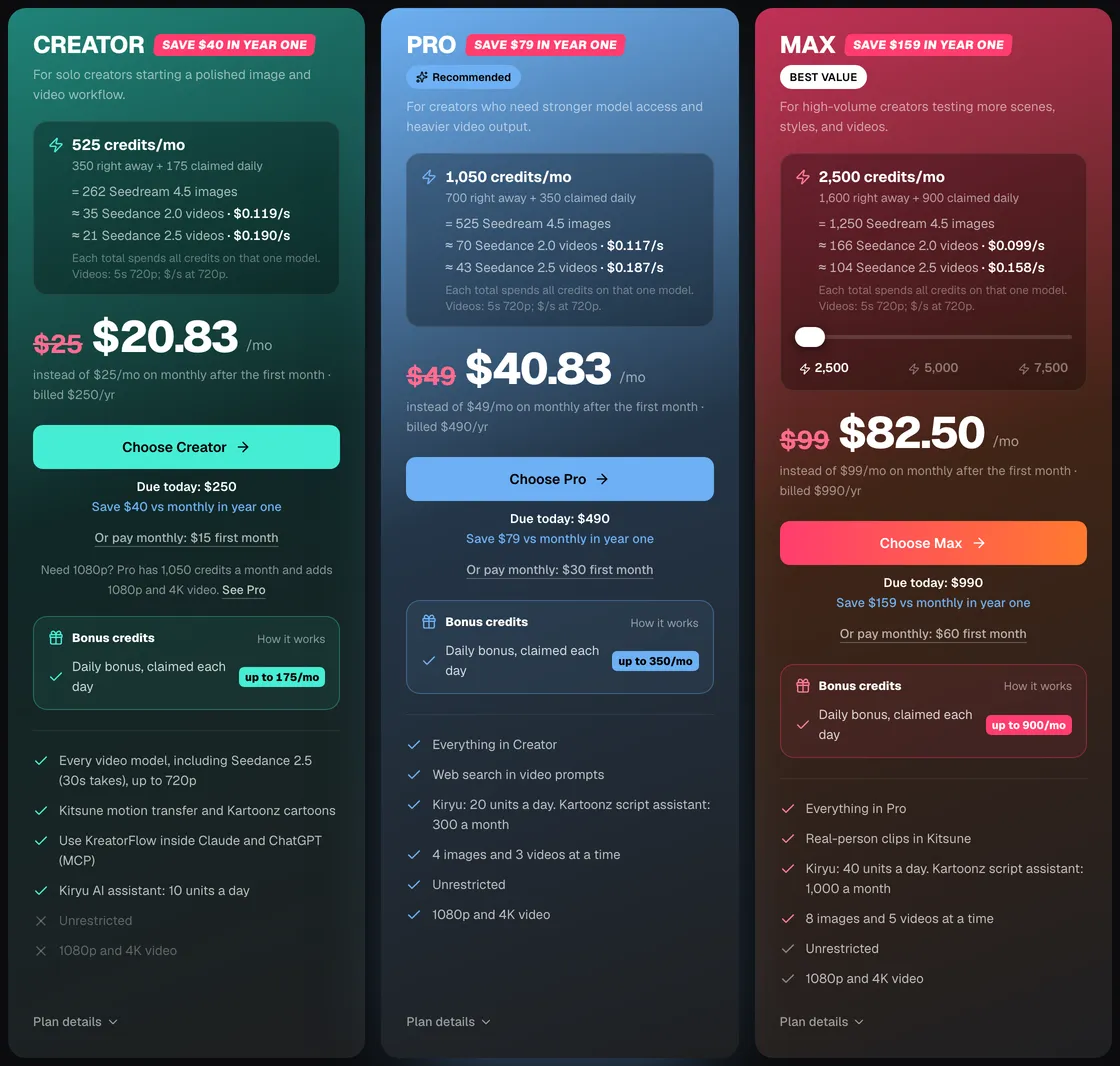
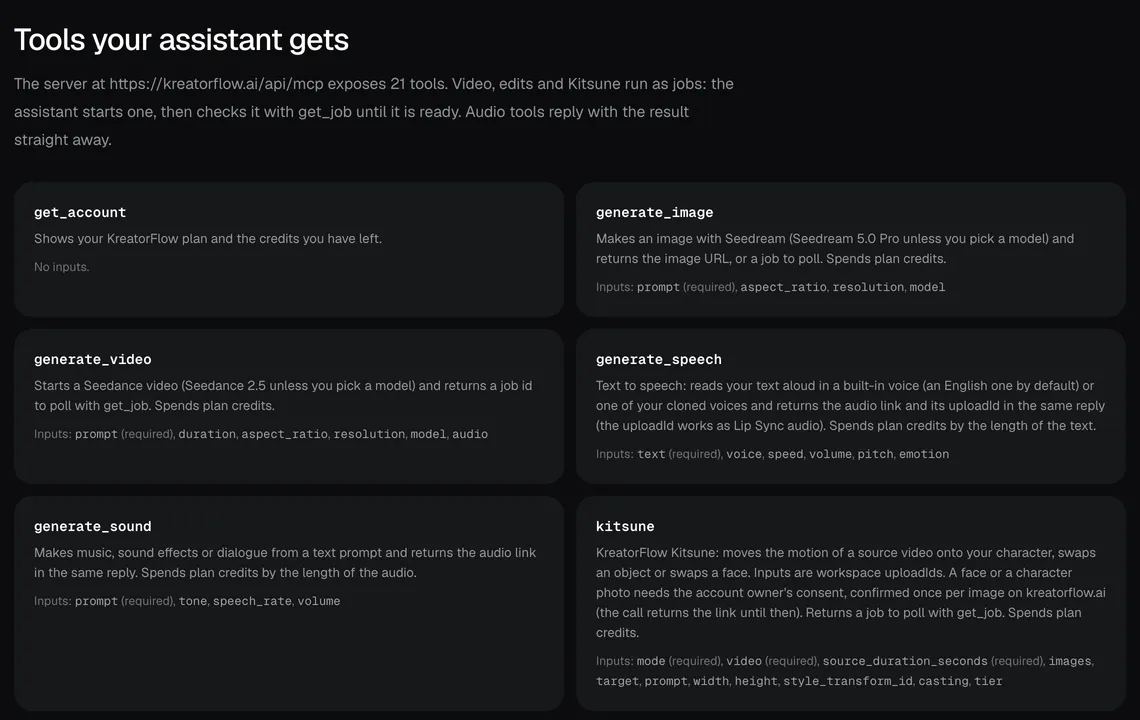
Be on a paid plan
The connector works on Creator, Pro, Max or Business, and during the $3 48-hour trial. Free accounts see "A paid plan is required" on the sign-in screen.
Screenshot of kreatorflow.ai, 2026-10-25 - 2
Add KreatorFlow as a custom connector
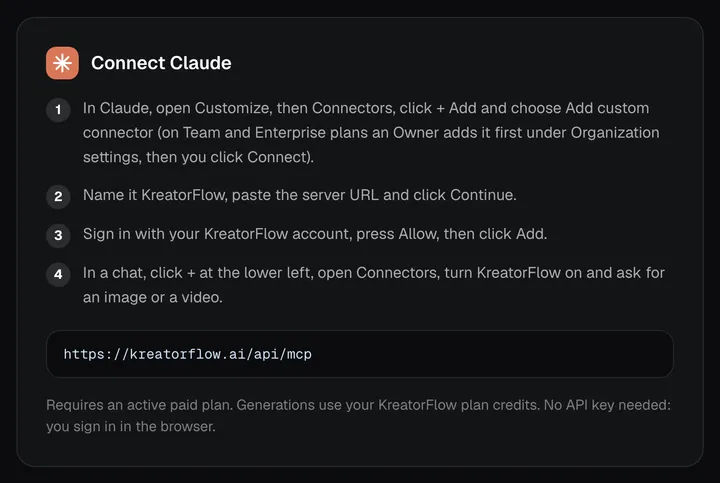
In Claude, ChatGPT or another MCP app, add a custom connector and paste the server URL: https://kreatorflow.ai/api/mcp. The KreatorFlow MCP page shows the steps for each app.
Screenshot of kreatorflow.ai, 2026-10-25 - 3
Sign in and press Allow
Your app opens a KreatorFlow sign-in page. Log in with the account that has the plan and press Allow. There is no API key to copy.
- 4
Turn the connector on in a chat
In Claude, switch KreatorFlow on from the chat's tools menu. Other apps list it with their tools once connected.
- 5
Ask for a video and wait for the link
Describe the shot in plain words. Without settings you get Seedance 2.5 at 5 seconds, 720p and 16:9. The assistant starts a job, checks it and replies with the link; the clip is also saved to your History. The MCP page lists every tool it can use.
Screenshot of kreatorflow.ai, 2026-10-25

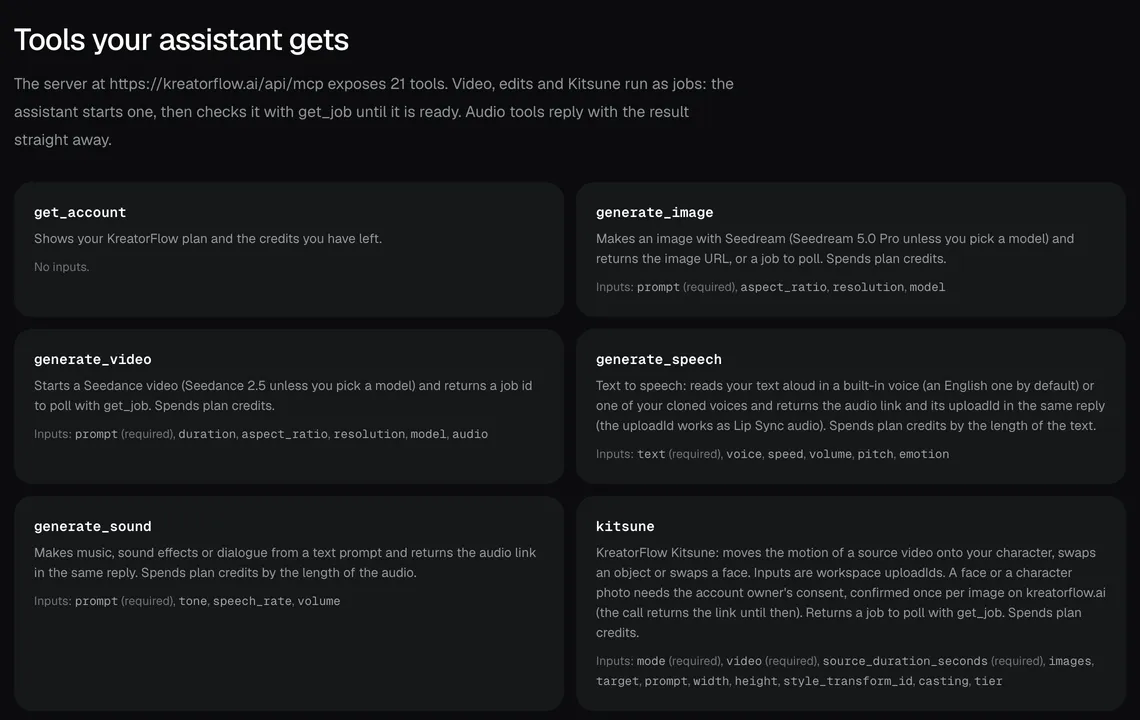
What you can ask for: all 21 tools
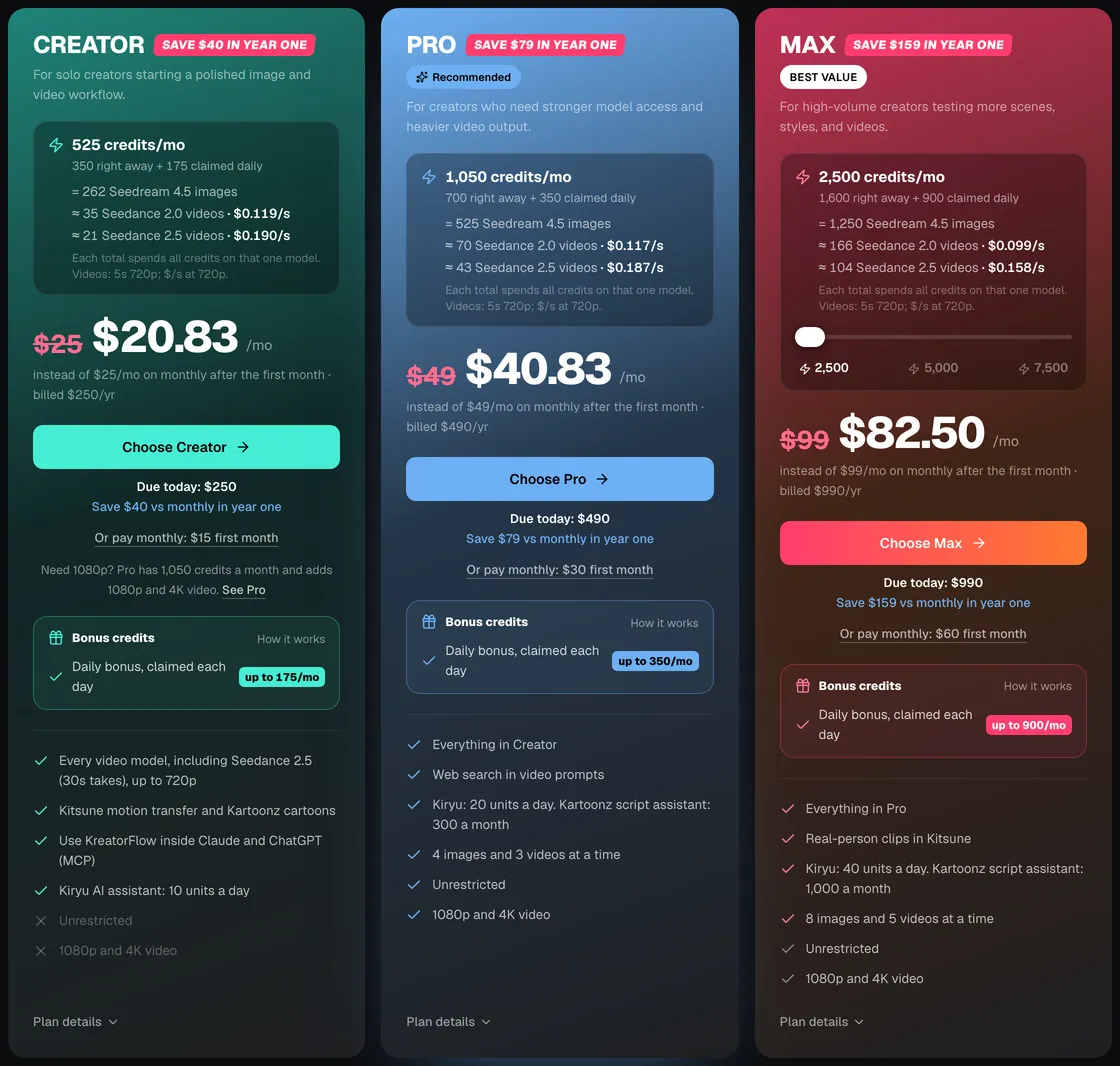
Every tool the KreatorFlow connector gives your assistant, in the order the server lists them, with a request that would make the assistant use it. You never type the tool name: the assistant picks the tool from what you ask. Video, image edits, face swap and Kitsune run as jobs that the assistant checks with get_job; audio tools reply with the result straight away.
| Tool | What it does | Example request |
|---|---|---|
| get_account | Shows your KreatorFlow plan and the credits you have left. | "How many KreatorFlow credits do I have left?" |
| generate_image | Makes an image with Seedream (Seedream 5.0 Pro unless you pick a model) and returns the image URL, or a job to poll. Spends plan credits. | "Make a 16:9 image of a lighthouse in a storm at dusk." |
| generate_video | Starts a Seedance video (Seedance 2.5 unless you pick a model) and returns a job id to poll with get_job. Spends plan credits, or uses your Unlimited pass for that model when you ask for it. | "Make a 5-second vertical clip of a barista pouring latte art, slow push-in." |
| generate_speech | Text to speech: reads your text aloud in a built-in voice (an English one by default) or one of your cloned voices and returns the audio link and its uploadId in the same reply (the uploadId works as Lip Sync audio). Spends plan credits by the length of the text. | "Read this script aloud in a calm female voice." |
| generate_sound | Makes music, sound effects or dialogue from a text prompt and returns the audio link in the same reply. Spends plan credits by the length of the audio. | "Make 20 seconds of upbeat lo-fi music for a product video." |
| kitsune | KreatorFlow Kitsune: moves the motion of a source video onto your character, swaps an object or swaps a face. Inputs are workspace uploadIds. A face or a character photo needs the account owner's consent, confirmed once per image on kreatorflow.ai (the call returns the link until then). Returns a job to poll with get_job. Spends plan credits. | "Use the motion from this dance clip on my saved character." |
| lip_sync | Makes the person in a photo speak a voice track (OmniHuman 2.0), 4 seconds to 5 minutes. The photo and the voice are workspace uploadIds (the uploadId generate_speech returns works as the voice). Paid plans only. Only use photos of people who agreed: calling it records your acceptance of the Terms and Acceptable Use Policy for the photo. Returns a job to poll with get_job. Spends plan credits by the second of audio. | "Use KreatorFlow's lip sync tool." |
| edit_image | Edits an image you already have with a prompt (Seedream image edit). The source is a workspace uploadId. Returns a job to poll with get_job. Spends plan credits. | "Change the background of this photo to a beach at sunset." |
| face_swap | Puts the face from one image onto another. Both images are workspace uploadIds. The account owner confirms once per new face, on kreatorflow.ai, that they are that person or have their permission: until then the call returns a confirmation link to show them. Returns a job to poll with get_job. Spends plan credits. | "Put the face from this headshot onto the poster image." |
| edit_video | Transforms, restyles or extends a video you already have (Seedance). The source is a workspace uploadId. Returns a job to poll with get_job. Spends plan credits. | "Restyle my last clip as a hand-drawn anime scene." |
| clone_voice | Creates a cloned voice from an audio sample (a public https URL or a workspace uploadId). The account owner must first confirm on kreatorflow.ai that they own the voice or have written permission: the first call returns a confirmation link to show them, then call again. Spends plan credits. | "Clone my voice from this recording. I confirm it is my voice." |
| transcribe | Speech to text: turns spoken audio (a public https URL or a workspace uploadId) into a transcript in the same reply. Spends plan credits by the length of the audio. | "Transcribe this interview recording." |
| translate_speech | Translates spoken audio into another language and speaks it back. Returns the translated text, an audio link and its uploadId. Spends plan credits by the length of the audio. | "Translate this voice note into Spanish and say it back." |
| save_character | Saves an image from your workspace as a reusable @character in your KreatorFlow library. | "Save this image as a character called Mia." |
| list_characters | Lists the reusable characters saved in your KreatorFlow library. | "Which characters do I have saved?" |
| list_history | Lists your recent images, videos and audio, each with the uploadId the edit, Kitsune and face swap tools take. | "Show me the last five videos I made." |
| list_voices | Lists the voices generate_speech can use: KreatorFlow's built-in voices (name, language, description) and your cloned voices. Pass an entry's voice value as generate_speech's voice. | "Which cloned voices are ready to use?" |
| list_models | Lists the KreatorFlow image models you can pick from (ids, names and tags). | "Which image models can I pick from?" |
| list_templates | Lists KreatorFlow's public templates: names, descriptions, categories, the reference images each asks for and their default settings. | "List the video templates I can use." |
| upload_media | Copies a public image, video or audio URL into your workspace and returns an uploadId for the edit, Kitsune, face swap, voice and character tools. | "Use this video link as the source for an edit." |
| get_job | Checks a generation job and returns its status (QUEUED, PROCESSING, COMPLETED or FAILED) and, once it is done, the result URL. Works for image, video, edit, Kitsune and Lip Sync jobs. | "Is my video ready yet?" |
Sources, as checked:
- Anthropic: custom connectors using remote MCP, checked 17 October 2026: support.claude.com/en/articles/11175166-get-started-with-custom-connectors-using-remote-mcp
- Claude Code docs: MCP, checked 17 October 2026: code.claude.com/docs/en/mcp
- OpenAI developer docs: connect to ChatGPT, checked 17 October 2026: developers.openai.com/apps-sdk/deploy/connect-chatgpt
What it costs
Credits are read from the same code the studio uses to charge, so the price through Claude or ChatGPT is the price in the studio. There is no extra fee for using MCP, and checking a job or reading your balance, history and lists costs nothing.
| What you make | Credits | Tool |
|---|---|---|
| Seedance 2.5 video, 5 s, 720p | 24 credits | generate_video (the default) |
| Seedance 2.5 video, 5 s, 1080p | 50 credits | generate_video |
| Seedance 2.5 video, 5 s, 4K | 120 credits | generate_video |
| Seedance 2.5 video, 30 s, 720p | 140 credits | generate_video with a longer duration |
| Seedream 5.0 Pro image, 2K | 4 credits | generate_image (the default) |
| Seedream 5.0 Pro image, 1K | 2 credits | generate_image at 1k |
| Text to speech | 2 credits per 1,000 characters, charged in whole 1,000-character blocks | generate_speech |
| Music and sound effects | 1 credit per 10 seconds of audio, at least 2 credits | generate_sound |
| Voice clone | 60 credits per voice | clone_voice |
| Transcription | 1 credit per 5 minutes of audio | transcribe |
| Speech translation | 3 credits per minute of audio | translate_speech |
| Edits, face swap and Kitsune | Same as in the studio | edit_image, edit_video, face_swap, kitsune |
Your plan's rules apply as usual. Failed and blocked generations give their credits back automatically. Ask the assistant to call get_account to see your balance before a big batch.
Seedance price per second on KreatorFlow
Seedance 2.0 and 2.5 at 720p and above: price per second on each plan (monthly and annual), credits per 5-second clip, and clips per plan.
| Model · resolution | Credits | Per second | USD per second (monthly) | USD per second (annual) | Creator · 525 credits/mo | Pro · 1,050 credits/mo | Max · 2,500 credits/mo | Business (2 seats) · 4,500 credits/mo |
|---|---|---|---|---|---|---|---|---|
| Seedance 2.0 · 720p | 15/5s | 3/s | $0.119–0.145/s | $0.099–0.121/s | 35 | 70 | 166 | 300 |
| Seedance 2.0 · 1080p | 30/5s | 6/s | $0.238–0.289/s | $0.198–0.241/s | 17 | 35 | 83 | 150 |
| Seedance 2.0 · 4K | 70/5s | 14/s | $0.554–0.675/s | $0.462–0.563/s | Pro and up | 15 | 35 | 64 |
| Seedance 2.5 · 720p | 24/5s | 4.8/s | $0.190–0.231/s | $0.158–0.193/s | 21 | 43 | 104 | 187 |
| Seedance 2.5 · 1080p | 50/5s | 10/s | $0.396–0.482/s | $0.330–0.402/s | 10 | 21 | 50 | 90 |
| Seedance 2.5 · 4K | 120/5s | 24/s | $0.950–1.157/s | $0.792–0.964/s | Pro and up | 8 | 20 | 37 |
Seedance 2.0 and 2.5, 720p and above. Plan columns: 5-second clips a month on the plan's full monthly credits. Longer clips cost the same per second, so a 10-second clip uses twice the credits. Generated audio is included. USD per second: each plan's price over its full monthly credits, lowest to highest plan; monthly is the regular monthly price, annual is the yearly price divided by 12.
AI video MCP servers compared
Checked 2 November 2026 on each provider's own MCP page. KreatorFlow's row comes from our server's code; a rival's cell says "Not stated on its MCP page" where its page does not say. Runway and HeyGen are not in the table because their MCP pages could not be read that day.
| Server | Clients | Models | Auth | Billing | Shows cost before generating |
|---|---|---|---|---|---|
| KreatorFlow (https://kreatorflow.ai/api/mcp) | Claude, Claude Code, ChatGPT, Cursor, VS Code (GitHub Copilot), Windsurf and other MCP clients | Seedance 2.5 and 2.0 video, Seedream images, OmniHuman 2.0 Lip Sync, audio | OAuth sign-in, no API key (developers: https://kreatorflow.ai/v1/mcp with an API key) | Your plan credits, at studio prices | Every credit price is published and the same as in the studio; get_account shows your balance |
| Higgsfield (mcp.higgsfield.ai/mcp) | ChatGPT, Claude, Claude Code, Telegram, CLI and other MCP clients | "30+ models for image and video generation" (not named on the page) | "No API key required" | Not stated on its MCP page | Not stated on its MCP page |
| fal (mcp.fal.ai/mcp-relay) | ChatGPT, Claude, Claude Code, Cursor, Codex CLI and other Streamable HTTP and OAuth clients | fal's model catalog: image, video and audio models | OAuth sign-in, no API key | fal credits, at the same prices as its API; the MCP server itself is free | Has a pricing tool; its docs ask the assistant to show the estimated cost first (a prompt instruction, not a server-side check) |
Sources, as checked:
- Higgsfield MCP page, checked 2 November 2026: higgsfield.ai/mcp
- fal docs: MCP, checked 2 November 2026: fal.ai/docs/documentation/model-apis/mcp
- KreatorFlow MCP server: /mcp
What is MCP, and how does it let Claude or ChatGPT make video?
MCP (the Model Context Protocol) is an open standard that lets an AI assistant use outside tools. A service publishes an MCP server that describes its tools and their inputs; an app such as Claude or ChatGPT connects to it, and from then on the assistant can call those tools when your request needs them. Claude and ChatGPT do not render video themselves, so a video model has to be connected as a tool.
The KreatorFlow MCP server is that tool. KreatorFlow is an official partner of BytePlus, a ByteDance company, and video runs on ByteDance's Seedance models while images run on Seedream. When you ask for a clip, the assistant turns your words into a prompt and settings, calls generate_video on your own KreatorFlow account, and gives you the finished link. You keep chatting to adjust it, the same way you would brief an editor.
How do you connect KreatorFlow to Claude?
Add it as a custom connector with the server URL https://kreatorflow.ai/api/mcp, then sign in. This works on Claude on the web and in Claude Desktop. Our steps are in the list below.
Claude moves its menus from time to time. As of 17 October 2026, Anthropic's help center puts them under Customize, then Connectors, then + Add and Add custom connector. It lists custom connectors on Claude's Free, Pro, Max, Team and Enterprise plans (Free is limited to one), and on Team and Enterprise an owner adds the connector before each person connects to it.
If Claude shows authentication options, keep sign-in on: KreatorFlow uses OAuth and needs no request headers or API key.
- In Claude, open Customize, then Connectors, click + Add and choose Add custom connector (on Team and Enterprise plans an Owner adds it first under Organization settings, then you click Connect).
- Name it KreatorFlow, paste the server URL and click Continue.
- Sign in with your KreatorFlow account, press Allow, then click Add.
- In a chat, click + at the lower left, open Connectors, turn KreatorFlow on and ask for an image or a video.
How do you add it to Claude Code?
Run one command in your terminal, then sign in from inside Claude Code. Handy when you want clips for something you are building without leaving the terminal.
Run the command below in your terminal.
Start Claude Code, type /mcp, pick kreatorflow and sign in when the browser opens.
Check the connection with claude mcp list.
The --scope user flag makes the server available in every project. Claude Code's MCP docs (checked 17 October 2026) describe the same browser sign-in from /mcp, and claude mcp list shows each server's status.
Claude Code command
claude mcp add --transport http --scope user kreatorflow https://kreatorflow.ai/api/mcp
How do you connect it to ChatGPT?
Add KreatorFlow as a custom connector with the server URL https://kreatorflow.ai/api/mcp and OAuth sign-in. Our steps are in the list below.
OpenAI renames this area from time to time (connectors became apps, next to plugins). As of 17 October 2026, OpenAI's developer docs describe adding a server from ChatGPT's Plugins page with Add custom MCP server, its public HTTPS URL and authentication. Which plans and workspaces can add custom MCP servers is set by OpenAI and your admin, so check OpenAI's help center if you don't see the option.
If ChatGPT asks you to confirm a tool call, confirm it: generating a clip is an action on your account that spends credits.
- In ChatGPT, open the Plugins page, click + and choose Add custom MCP server (your account or workspace settings decide whether custom servers are allowed).
- Name it KreatorFlow, paste the server URL under Connection and choose OAuth as the authentication.
- Confirm the warning, sign in with your KreatorFlow account and press Allow.
Does it work in Cursor, VS Code and other MCP apps?
Yes. Every app connects to the same server URL and signs in with your KreatorFlow account. Setup steps for Cursor, VS Code (GitHub Copilot), Windsurf and Other MCP clients are on the KreatorFlow MCP page, with one-click install links for Cursor and VS Code.
Any client that supports remote MCP servers over Streamable HTTP with OAuth can connect directly; local-only clients can use the mcp-remote bridge: npx -y mcp-remote https://kreatorflow.ai/api/mcp.
What happens when you ask Claude or ChatGPT for a video?
The assistant starts a job and checks it until the clip is ready. generate_video takes your prompt plus any duration, aspect ratio, resolution or model you gave, and returns a job id with the status QUEUED or PROCESSING. The assistant calls get_job until the status is COMPLETED and reads the result URL. A FAILED job gives its credits back.
Defaults, when you don't say otherwise: Seedance 2.5, 5 seconds, 720p and 16:9, with the clip's sound and spoken voices generated (ask for a silent clip if you don't want them). In the studio, Seedance 2.5 offers 4 to 30 second clips at 720p, 1080p and 4K. Images default to Seedream 5.0 Pro at 2K; an image comes back as a link in the same reply when it finishes quickly, or as a job when it takes longer.
Every result lands in your KreatorFlow History, like anything made in the studio, so you can download it or ask the assistant to edit it later.
Example: a product clip from one message
Illustration only, not a recorded transcript: this is the shape of a typical exchange. The assistant's wording and the timings vary.
You: "Make a 5-second vertical video of a glass perfume bottle on wet black stone, slow orbit, soft rim light, raindrops in the air."
Assistant: calls generate_video with your description as the prompt, duration 5 and aspect ratio 9:16, and tells you the clip is rendering. It then calls get_job, sees PROCESSING, and checks again later. When the status is COMPLETED it replies with the video link. At the default 720p, that clip costs 24 credits.
You: "Nice. Now a 16:9 version at 1080p." The assistant starts a second job. If your plan doesn't include 1080p, the tool returns the studio's plan message and the assistant can offer 720p.
Example: restyling a clip you already have
Illustration only, not a recorded transcript.
You: "Here's a link to my clip: https://example.com/walk.mp4. Restyle it as a watercolour painting."
Assistant: calls upload_media with the link, which copies the file into your workspace and returns an uploadId, then calls edit_video with that uploadId, the edit mode restyle and your prompt, and checks the job with get_job. Something already in your library can be passed by its kreatorflow.ai link or id, with no new upload.
The same pattern drives edit_image, face_swap and kitsune: upload or pick the source, run the tool, check the job. Ask "use the moves from my last dance video on my saved character" and the assistant finds both with list_history and list_characters, then runs kitsune in motion-transfer mode.
Example: a voiceover for the clip
Illustration only, not a recorded transcript.
You: "Write a 15-second voiceover for the perfume clip and read it in a warm, low voice."
Assistant: writes the script in the chat, picks a built-in voice (or one of your cloned voices from list_voices) and calls generate_speech. Audio tools answer in the same reply, so the link to the voiceover comes straight back. Text to speech costs 2 credits per 1,000 characters, charged in whole 1,000-character blocks, and one request can be up to 5,000 characters.
How should you phrase requests to get a good clip?
Describe the shot like a director. The assistant writes the prompt for generate_video, so the more concrete you are, the better it is.
- Say who or what is on screen, the one action that happens, the place and the light.
- Name the camera move: slow push-in, orbit, crane down, handheld, static wide shot.
- Give the settings you care about: length in seconds, vertical (9:16) or wide (16:9), and 720p or 1080p.
- Ask to see the prompt before it generates, if you want to approve it first.
- Change one thing at a time when you iterate ("same shot, warmer light").
How much does it cost to make video in Claude or ChatGPT?
The same as in the KreatorFlow studio: each generation spends your plan credits, and longer or higher-resolution video costs more. With the defaults, a 5-second 720p Seedance 2.5 clip is 24 credits and a Seedream 5.0 Pro image at 2K is 4 credits. The table above lists the rest.
KreatorFlow adds nothing for using MCP. Your Claude or ChatGPT subscription is separate and pays for the assistant itself.
Plan credits and Developer API tokens are separate balances: the connector spends credits, the developer MCP server (below) spends tokens.
What are the limits?
The connector follows the same rules as your account in the studio. These are the ones people run into:
- A paid plan: Creator, Pro, Max or Business, or the $3 48-hour trial while it lasts. Free and Lite accounts can't connect.
- Plan rules still apply: 4K video is available on Pro, Max and Business.
- Seedance 2.5 clips run from 4 to 30 seconds; the lengths you can ask for depend on the model.
- Kitsune needs a source clip of at least 4 seconds and 1 to 4 images (motion transfer with an art-style preset needs no image).
- Voice cloning needs your confirmation that you have the right to clone the voice.
- Your assistant app has its own rules (which plans can add connectors, whether tool calls need confirming), set by Anthropic or OpenAI.
What if the connector won't connect or a video fails?
Remove the connector, add it again with the exact server URL, and sign in with the account that has the paid plan. That fixes most problems. The common messages:
- "A paid plan is required": check which workspace you signed in to, upgrade if needed (Creator, Pro, Max or Business), then connect again.
- "Invalid client", "Invalid redirect" or access denied: remove KreatorFlow from your app's connectors, add it again and press Allow.
- "Session expired" or a sign-in loop: log in at kreatorflow.ai in the same browser, then connect again.
- It worked before but now asks you to sign in: sign-ins renew on their own while you use the connector, and a connection left unused for 30 days asks you to sign in again.
- "Insufficient credits" or a plan message: top up or claim your daily credits, or ask the assistant to lower the resolution or length.
- A video that seems stuck: ask the assistant to check the job again with get_job. A failed job gives its credits back, and a finished clip is in your History even if the chat lost track of it.
Is it safe? What can the assistant access?
You sign in on KreatorFlow's own page with OAuth, so you never give your KreatorFlow password or an API key to Claude or ChatGPT. The connection is granted one scope, kreatorflow.generate, on the account and workspace you approve. Access tokens last 1 hour and are refreshed by the app; a refresh token lasts 30 days and changes on every refresh.
The assistant can only use the 21 tools in the table: make and edit media, read your plan, credits, history, characters and voices, and copy media you give it into your workspace. Everything is billed to and saved in your own account, under the studio's rules.
What you type in the chat is also handled by the assistant's company under its own privacy terms. To stop the assistant using KreatorFlow, turn the connector off or remove it from your app.
Is there an API-key version for developers?
Yes. For your own agents, scripts and backends there is the developer MCP server at https://kreatorflow.ai/v1/mcp. It takes a kf_ API key (as Authorization: Bearer kf_... or an x-api-key header) instead of a sign-in, and spends prepaid Developer API tokens instead of plan credits: one token is $0.05, and a 5-second 720p Seedance 2.0 clip is 11 tokens.
Its tools are list_models, generate_image, generate_video, edit_video, lip_sync, list_voices, generate_speech, generate_sound, get_job and get_balance, calling the same /v1 endpoints, scopes and prices as the Seedance API. It has no audio tools.
Claude connector questions other guides skip
Most pages on this stop at "connect an MCP server". These are the questions people ask next, answered from the KreatorFlow server's own code.
Exactly which tools does the connector add to Claude?
21 tools, read from the server's own tool registry: get_account, generate_image, generate_video, generate_speech, generate_sound, kitsune, lip_sync, edit_image, face_swap, edit_video, clone_voice, transcribe, translate_speech, save_character, list_characters, list_history, list_voices, list_models, list_templates, upload_media and get_job. Claude picks one from what you ask, so you never type a tool name. Video, edit, Kitsune and Lip Sync tools start a job that Claude checks with get_job, an image comes back in the reply or as a job when it takes longer, and audio tools answer in the same reply.
Source: KreatorFlow MCP page: tool list
Does Claude ask before it spends my credits?
Each tool tells Claude what kind of action it is. 7 tools (get_account, list_characters, list_history, list_voices, list_models, list_templates and get_job) are marked read-only and never spend credits. The other 14 are marked as actions on your account, so Claude can ask you to approve the call first; how often it asks is set by your tool permissions in Claude. Ask Claude to call get_account before a big batch to see your balance.
What does a failed or blocked generation cost?
Nothing. A job that ends as FAILED, including one stopped by a safety check, gives its credits back to your balance automatically, and get_job tells Claude it failed so it can say why or try again with a changed prompt. A finished 5-second 720p Seedance 2.5 clip is 24 credits, the same as in the studio.
How long does Claude take to hand back a video?
About 3 minutes for a 5-second 720p Seedance 2.5 clip and about 4 minutes for 10 seconds, from the studio's render times fitted on finished jobs. Claude keeps checking the job meanwhile; if the chat loses track, ask it to check again, and the finished clip is in your History either way.
Why did Claude send me a link to confirm a face or a voice?
Face swap, Kitsune with a face or character photo, and voice cloning need the account owner's own consent, and Claude is not allowed to give it for you. The first call returns a confirmation link to kreatorflow.ai: open it, sign in and tick the box (the link works for 15 minutes), then tell Claude you have confirmed and it runs the same request again. Nothing is created or charged before you confirm.
What happens to the connection if my plan ends?
It stops working. Every tool call and every sign-in renewal checks the plan, and an account on Free gets a message that the connector needs a paid plan (Creator, Pro, Max or Business). Upgrade, then reconnect.
Source: Plans
How do I take KreatorFlow's access away from Claude?
Remove KreatorFlow from Claude's connectors (in Claude Code: claude mcp remove --scope user kreatorflow). Claude can then no longer call the tools or renew its sign-in. Access tokens last 1 hour, and a connection that goes unused for 30 days expires on its own. Your media stays in your KreatorFlow History.
Source: Anthropic: custom connectors
Can Claude make a voiceover longer than one message?
Yes, in parts. One generate_speech call reads up to 5,000 characters, billed at 2 credits per started 1,000 characters, so Claude can split a long script and make one file per part. Each reply carries the audio link straight away.
Frequently asked questions
Can Claude generate videos?
Not on its own, but it can with a video tool connected. Add the KreatorFlow MCP server as a custom connector in Claude (web, Claude Desktop or Claude Code), sign in, and ask for a clip: Claude calls generate_video on your KreatorFlow account and replies with the link to a Seedance 2.5 video.
Can ChatGPT make AI videos?
Yes, through a custom MCP connector. Add https://kreatorflow.ai/api/mcp with OAuth sign-in, sign in with your KreatorFlow account, and ask for a video in the chat. Whether your ChatGPT plan or workspace can add custom MCP servers is set by OpenAI and your admin.
Is there a Seedance MCP server?
Yes. The KreatorFlow MCP server runs ByteDance's Seedance for video and Seedream for images. KreatorFlow is an official partner of BytePlus, a ByteDance company. The connector for chat apps is at https://kreatorflow.ai/api/mcp; the developer server for API-key agents is at https://kreatorflow.ai/v1/mcp.
How much does a video cost through MCP?
The same as in the studio, from your plan credits. With the defaults, a 5-second 720p Seedance 2.5 clip is 24 credits and a Seedream 5.0 Pro image at 2K is 4 credits. There is no extra fee for MCP, and failed jobs are refunded automatically.
Do I need an API key?
No. The connector signs you in with your KreatorFlow account through OAuth, so there is nothing to copy or paste. Developers who prefer keys can use the developer MCP server with a kf_ API key.
Which plan do I need?
A paid KreatorFlow plan (Creator, Pro, Max and Business), or the $3 48-hour trial while it lasts. 4K video needs Pro, Max and Business. Your Claude or ChatGPT plan must also let you add custom connectors.
Can I edit my own videos or photos from Claude or ChatGPT?
Yes. Give the assistant a public link or pick something from your History: it copies the file in with upload_media, then runs edit_video (transform, restyle or extend), edit_image, face_swap or kitsune.
Is KreatorFlow made by Anthropic or OpenAI?
No. KreatorFlow is an independent AI video and image studio. Its MCP server works in Claude and ChatGPT because both apps support custom MCP connectors; neither company makes, endorses or partners with it.