Try this in the studio
How to start the channel, step by step
- 1
Pick a niche you can fill for a year
Choose one kind of story and one audience: bedtime tales, moments from history, an office comedy, mini mysteries. A narrow niche makes every upload easier to plan and easier for viewers to recognise.
- 2
Create a recurring character
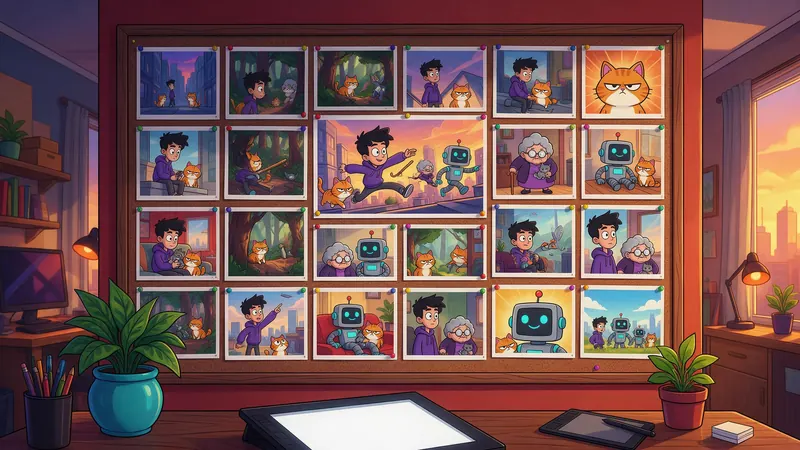
Design your host or hero once in the character studio, or upload your own drawing, and keep it in your assets. Add the same character to every cartoon: the first one you add leads the story.
- 3
Write a list of original ideas
Keep a running list of one-line ideas, a month ahead. Each one should be a new story with its own problem and payoff, not the last video with the names changed.
- 4
Choose the shape, length and style
Landscape 16:9 for long-form videos of up to 8 minutes, portrait 9:16 for Shorts. Pick one of 5 styles (3D cartoon, anime, comic book, claymation and ink Toon) and keep it for the whole channel.
- 5
Shape the story, then make it
Choose Shape the story first to read and edit the story before anything is made, then press Make my cartoon. The button shows the credits before anything is charged.
- 6
Add captions, upload, repeat
Pick a caption look, download with or without burned-in subtitles, upload on your schedule and label AI content where YouTube asks you to.
Credit budget for a weekly channel
One episode of 3 minutes in 16:9 and 3 Shorts of 1 minute in 9:16 every week, priced with the same function the studio charges with. A month here is 4 weeks. Captions add nothing.
| Model | Episode (3 min) | 3 Shorts (1 min each) | Per week | Per 4 weeks |
|---|---|---|---|---|
| Seedance 2.5 | 756 credits | 756 credits | 1,512 credits | 6,048 credits |
| Seedance 2.0 | 567 credits | 567 credits | 1,134 credits | 4,536 credits |
| Seedance 2.0 Fast | 454 credits | 456 credits | 910 credits | 3,640 credits |
| Seedance 2.0 Mini | 378 credits | 378 credits | 756 credits | 3,024 credits |
| Mixed: episode on Seedance 2.0, Shorts on Seedance 2.0 Mini | 567 credits | 378 credits | 945 credits | 3,780 credits |
Pick a niche and a recurring character
A faceless channel still needs a face: your character's. Viewers come back for someone they recognise and a kind of story they like, so decide both before the first upload.
Write down three things about your character that never change: the look, the personality and one habit or catchphrase. Save the character image in your assets so you can add the exact same character to every cartoon. The first character you add leads the story, and Kartoonz keeps it consistent from start to finish.
- Bedtime stories for kids with the same gentle animal host
- Moments from history told by a recurring narrator character
- An office comedy with a small cast of animal coworkers
- Mini mysteries solved by the same detective
- Science questions answered by one curious mascot
Where the story ideas come from
The ideas are your channel. Kartoonz writes and animates the story from one line, but the line should be yours, and it should be new every time. Repeating one template with small changes is exactly what YouTube treats as repetitive content.
Good ideas have a clear problem, a character who wants something and an ending that pays off. Keep a list and add to it whenever something makes you laugh or wonder.
- A problem: the hero has to fix something before someone notices
- A "what if": what if the class pet could talk for one day?
- A real moment: a small event from history, told by your narrator
- A viewer question, answered as a story
- A running joke that comes back with a new twist each week
Long-form or Shorts: choosing the length
Kartoonz makes cartoons from 15 seconds up to 8 minutes: the length slider starts at 15 seconds and then goes up a minute at a time. Every cartoon has one shape, chosen before you start, and every shape is delivered in 720p.
Landscape 16:9 is the shape for regular channel videos. Portrait 9:16 is the shape for Shorts; YouTube sets the maximum Shorts length, so check its current limit before you post a longer portrait video. Square 1:1 is there too, for feeds outside YouTube.
- Teaser Short: 15 seconds in 9:16, 32 credits on Seedance 2.0 Mini
- Short: 1 minute in 9:16, 126 credits on Seedance 2.0 Mini or 189 credits on Seedance 2.0
- Episode: 3 minutes in 16:9, 567 credits on Pro
- Longest episode: 8 minutes, 2,016 credits on Seedance 2.5
Captions that keep people watching
Captions are included at no extra cost. Kartoonz writes word-by-word captions timed to what the characters say and burns them in. Choose one of 3 looks (word pop with glow, karaoke highlight or a clean line) and 1 to 4 words per line.
Big, short caption lines suit Shorts, where many people watch with the sound off. For long-form you can download the cartoon without subtitles and add YouTube's own captions instead. Whatever you choose, keep the same look on every upload so the channel has one visual identity.
A posting rhythm you can keep
Consistency beats volume. Pick a rhythm you can keep for months, then put it on a calendar. A simple week looks like this:
- Monday: pick the week's story from your idea list and write it in one or two lines
- Tuesday: shape the story, make the episode and watch it through
- Wednesday: upload the episode with a clear title and thumbnail
- Thursday to Saturday: one Short of 1 minute a day that teases or extends the episode
- Sunday: read the comments and add the best ideas to your list
How the credits work
Kartoonz prices each cartoon once, by its length and model: 252 credits a minute on Seedance 2.5, 189 credits on Seedance 2.0, 152 credits on Seedance 2.0 Fast and 126 credits on Seedance 2.0 Mini. All four deliver 720p. Writing and editing the story costs nothing, and captions are included.
The credits are charged when the cartoon starts, and the price is on the button before you press it. If a cartoon fails before anything is animated, the credits go back to your balance automatically. Credits come with every plan, and credit packs top up your balance without a subscription.
YouTube monetization: the honest version
No tool can promise views, subscribers or income, and this guide doesn't either. YouTube decides who joins the YouTube Partner Program and which videos earn money.
YouTube's monetization policies require original, authentic content. Mass-produced or repetitive videos are not eligible; YouTube calls this inauthentic content. A channel that uploads the same template again and again with small changes can be refused or lose monetization, however the videos were made.
What helps is what makes a channel worth watching anyway: a new story in every video, characters and a tone that stay consistent, and something of your own in each upload, such as your ideas, your edits to the story and your running jokes. Follow YouTube's rules on labelling realistic AI-generated or altered content where they apply, and read the current policies in YouTube Studio before you apply.
On a paid KreatorFlow plan you own what you create and can use it commercially; content made on the free tier is for personal use only. You are responsible for what you publish, including the rights to any character or image you upload.
Frequently asked questions
Can I run a YouTube channel without showing my face?
Yes. Many channels are built around animated characters instead of a presenter. Kartoonz makes the cartoons; you plan the stories, upload them and build the audience. Growth and income depend on your content, your audience and YouTube, not on the tool.
Will YouTube monetize AI cartoons?
No tool can promise that. YouTube decides who joins the Partner Program, and its rules require original, authentic content: mass-produced or repetitive videos aren't eligible. Make a new, original story for every video and check YouTube's current monetization policies.
How much does a week of videos cost?
With one episode of 3 minutes and 3 Shorts of 1 minute, a week costs 1,512 credits on Seedance 2.5, 1,134 credits on Seedance 2.0, 910 credits on Seedance 2.0 Fast or 756 credits on Seedance 2.0 Mini. Making the episode on Seedance 2.0 and the Shorts on Seedance 2.0 Mini costs 945 credits a week. Captions are included.
How long should each video be?
Kartoonz makes cartoons from 15 seconds to 8 minutes. Long enough to tell one complete story is the right length: a few minutes in 16:9 for the channel and about a minute in 9:16 for Shorts. Check YouTube's current Shorts length limit before posting longer portrait videos.
Do I need to record my voice?
No. The cartoon comes with its characters, its sound and its captions, so you never appear on camera or record your voice.
Can I keep the same character in every video?
Yes. Add the same character image from your uploads, generations or saved assets to each cartoon. The first character you add leads the story and is kept consistent from start to finish. That consistency is what makes a channel recognisable.
Which resolution do the videos have?
Every cartoon is delivered in 720p, in portrait 9:16, square 1:1 or landscape 16:9, on all four models. Seedance 2.5 is the sharpest, Seedance 2.0 is faster, Seedance 2.0 Fast is for quick drafts and Seedance 2.0 Mini costs the fewest credits.