

Get started
Step by step
- 1
Create the character
Open the character studio. Upload a clear photo, or describe someone new, and pick style, hair, eyes and other details.
- 2
Save it
When you like the result, save it. It gets an @handle, for example @mara.
- 3
Call it in prompts
Write "@mara walks into the café and orders a coffee" in the image or video studio. The model uses the saved reference for her face.
- 4
Reuse it in templates
Templates work with characters too: put @mara at the end of an Earth zoom or in the middle of a bullet-time orbit.
- 5
Keep a style sheet
Write down the outfit, hair and setting words you used in shots you like, and paste them into the next prompt. The character keeps the face; your notes keep everything else matching.
Prompts that use a character
Image
@mara in a yellow raincoat on a Paris street at night, neon reflections on the wet pavement, 35mm photo.
Video
@mara looks back over her shoulder and laughs as she runs for the last train. Handheld tracking shot, platform lights.
Two characters
@mara and @theo sit across from each other at a diner booth, @theo slides a folded note across the table and @mara reads it, her smile fading. Static medium shot, warm neon light through the window.
Close-up
Close-up of @mara's face as she hears the news, eyes filling with tears, rain on the window behind her. Slow push in, soft grey light.
Seedance price per second on KreatorFlow
Seedance 2.0 and 2.5 at 720p and above: price per second on each plan (monthly and annual), credits per 5-second clip, and clips per plan.
| Model · resolution | Credits | Per second | USD per second (monthly) | USD per second (annual) | Creator · 525 credits/mo | Pro · 1,050 credits/mo | Max · 2,500 credits/mo | Business (2 seats) · 4,500 credits/mo |
|---|---|---|---|---|---|---|---|---|
| Seedance 2.0 · 720p | 15/5s | 3/s | $0.119–0.145/s | $0.099–0.121/s | 35 | 70 | 166 | 300 |
| Seedance 2.0 · 1080p | 30/5s | 6/s | $0.238–0.289/s | $0.198–0.241/s | 17 | 35 | 83 | 150 |
| Seedance 2.0 · 4K | 70/5s | 14/s | $0.554–0.675/s | $0.462–0.563/s | Pro and up | 15 | 35 | 64 |
| Seedance 2.5 · 720p | 24/5s | 4.8/s | $0.190–0.231/s | $0.158–0.193/s | 21 | 43 | 104 | 187 |
| Seedance 2.5 · 1080p | 50/5s | 10/s | $0.396–0.482/s | $0.330–0.402/s | 10 | 21 | 50 | 90 |
| Seedance 2.5 · 4K | 120/5s | 24/s | $0.950–1.157/s | $0.792–0.964/s | Pro and up | 8 | 20 | 37 |
Seedance 2.0 and 2.5, 720p and above. Plan columns: 5-second clips a month on the plan's full monthly credits. Longer clips cost the same per second, so a 10-second clip uses twice the credits. Generated audio is included. USD per second: each plan's price over its full monthly credits, lowest to highest plan; monthly is the regular monthly price, annual is the yearly price divided by 12.
Why AI faces change from shot to shot
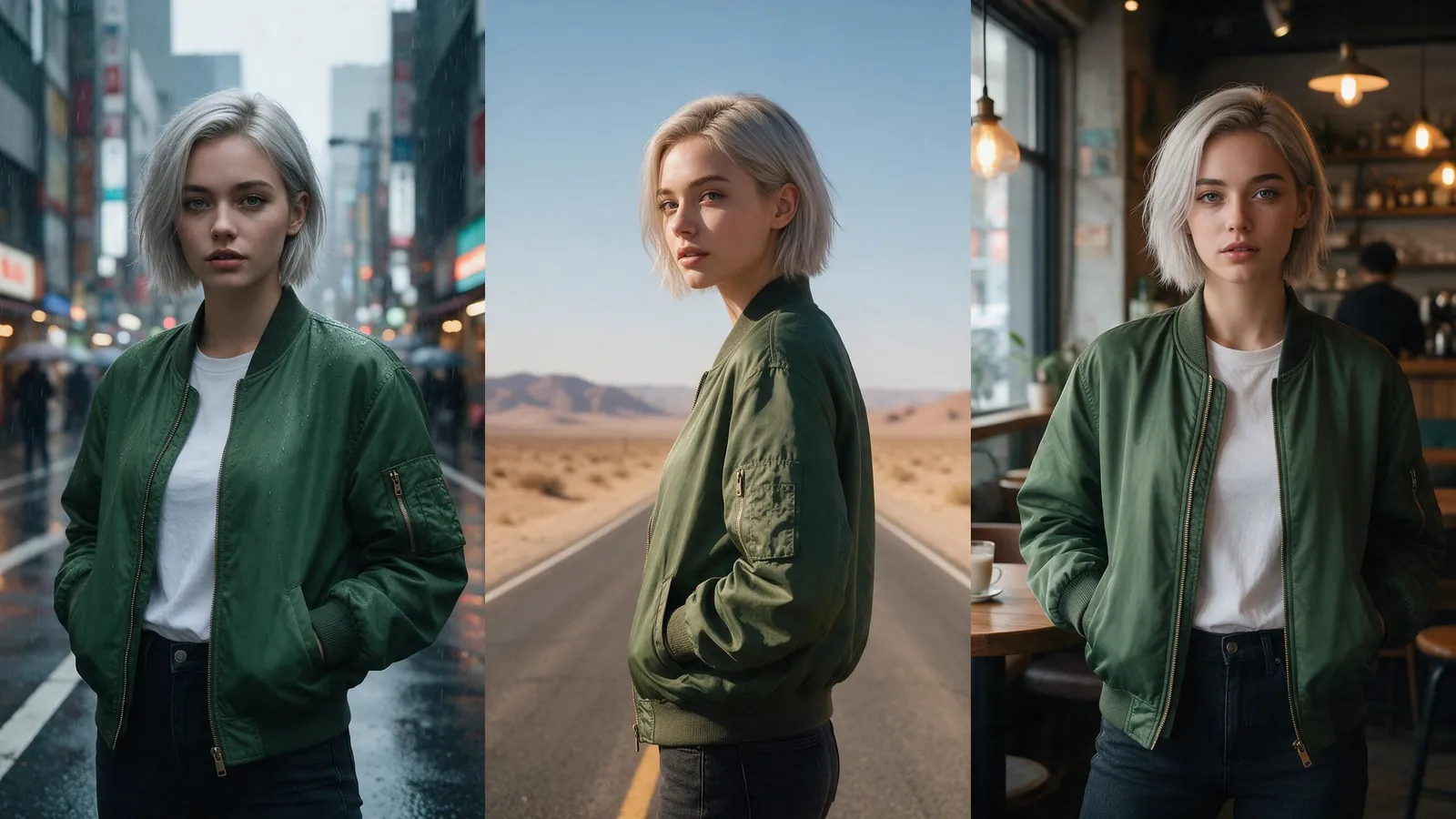
Every generation starts fresh. If you describe a person in words, "a woman in her twenties with curly red hair and freckles", the model creates a new person who fits that description each time. The details match, but the face does not. That is fine for a single shot and a problem for a series, a story or a brand mascot.
A saved character fixes this by giving the model a picture to follow instead of a description. You make the face once, approve it, and every later prompt that names the @handle uses that reference. You stop rolling the dice on identity and only roll it on the shot itself.
Tips for a stronger likeness
Start from a clear, well-lit, front-facing photo. Hats, sunglasses and heavy shadows hide the features the model needs.
Keep outfit and hair in the prompt, not in the character, if you want to change them from shot to shot.
Frame the face well in the shots that matter. A character standing far away in a wide shot has fewer pixels for the face, so the likeness is looser. Use medium shots and close-ups for the moments where people need to recognise them.
Keep the action believable for one take. Fast spins, faces turned away and heavy motion blur all make the face harder to hold.
A workflow for a series or story
For anything with recurring people, such as a short drama, a mascot, or a faceless channel with a host, this order keeps things consistent:
- Design every recurring character first, before writing shots. Save each one with a short, memorable @handle.
- Make a still image of each character in their main outfit. Use those stills to check the look before you spend credits on video.
- Write a shot list with one line per clip: who is in it, what they do, where, and the camera move.
- Paste the same outfit and setting words into every prompt for the same scene.
- Generate the key close-ups first. If the face holds there, the wider shots are easier.
- Cut the clips together in an editor and add voice and music last.
What people use saved characters for
Short films and AI series with the same cast in every episode. Brand mascots and virtual presenters that appear in every ad. UGC-style ads where the same creator reviews several products. Faceless YouTube and TikTok channels with a recurring host. And personal projects, such as putting yourself into a trailer or a travel montage, using your own photo.
Real people
Only create characters from photos you have the rights and consent to use, such as yourself or someone who has agreed. Saved characters are registered in BytePlus's trusted asset library, and the Acceptable Use Policy forbids impersonation.
Templates for this guide
Each template has its own page with a preview, the credit cost and a link to the studio.
- Bullet Time 360 OrbitA frozen moment with the camera orbiting 360 degrees around your subject, particles hanging in the air.
- Earth Super ZoomOne continuous zoom from space, through the clouds and a city, down to a single subject in close-up.
- Worms Eye Hero RevealAn extreme low angle from the ground that makes your subject tower over the camera, backlit against the sky.
- UGC HookA vertical, social-first UGC opener with handheld movement and the product clearly in frame.
Frequently asked questions
Does using a saved character cost extra?
Creating it costs 4 credits. After that you pay the normal cost of the image or video you generate.
Can I use two characters in one shot?
Yes. Mention both @handles. Seedance 2.0 takes up to 9 image references per generation.
Can I make a character for free?
New accounts get 25 starter credits for images and video, which is enough to try the character studio.
How do I keep the same face in AI videos?
Save the person as a character, then mention their @handle in every video prompt. The model uses the saved reference for the face instead of inventing a new one from a text description.
Can I change a character's clothes between shots?
Yes. Describe the outfit in the prompt, for example "@mara in a black evening dress". The character keeps the face, and the prompt sets the clothes, hair and setting for that shot.
Can I make a cartoon or anime character, not a realistic person?
Yes. Choose the style when you create the character, or describe it. Keep the same style words in your prompts so every shot matches.
Why does my character look slightly different in wide shots?
In a wide shot the face takes up only a few pixels, so there is less detail to match. Use medium shots and close-ups for the moments that need a strong likeness.